

Pick a USB data recovery tool among MiniTool Power Data Recovery, Stellar Data Recovery for Mac, Disk Drill, Recuva, EaseUS Data Recovery Wizard, and Wondershare Recoverit to recover data. When the data is restored, check the tips to protect your USB data in the future.
USB devices have become indispensable storage tools in our daily lives and work. Their portability, speed, and ease of use make them widely used for file transfers, data backups, etc.
However, their frequent use also brings a higher risk of drive corruption and data loss. Don’t worry. This post offers you the best USB data recovery tool.
What to Do When You Lose USB Data
When your USB data is lost, the first thing is to restore it. Here, refer to the following tips to increase the possibility of data recovery.
- Stop using the USB device. Do not write any more data to it: new data may overwrite the original file, making it irrecoverable. Do not format or attempt to repair it: unauthorized repair may cause more serious data damage.
- Check for a simple malfunction. Try reading the USB device on another computer or operating system. Check for loose connectors or a working USB port.
- Check for backup files. If you have a backup, open it and directly restore the desired data.
- Use data recovery software. Unlike data stored on a computer, deleted USB data will not be stored in the Recycle Bin. Therefore, if you do not have a backup, data recovery software is required. They can thoroughly scan your USB drive and recover files lost for various reasons.
How to Choose a USB Data Recovery Tool
There are many data recovery software on the market. If you don’t know how to choose a USB data recovery tool, the following standards can be used as a reference.
1. Recovery capabilities and success rates
- Supports various recovery scenarios, such as accidental deletion, formatting, partition loss, and virus attacks.
- Features a deep scan function, enabling recovery of older or more fragmented data.
- Supports file previews to ensure you’re recovering exactly what you need.
2. System and storage device compatibility
- Supports your operating system (Windows, macOS).
- Supports multiple file systems (FAT32, NTFS, exFAT).
- Compatible with various USB devices: USB flash drives, SD cards, external hard drives, etc.
3. User experience
- Owns a user-friendly interface, suitable for non-technical users.
- Performs fast scans to save time.
- Provides available technical support services.
4. Pricing and trial
- Offers a free trial.
- Offers competitively priced advanced editions for professional use.
Recommended USB Data Recovery Tools Windows/Mac
After understanding the screening criteria, I will recommend some software with good reviews here.
1. MiniTool Power Data Recovery
MiniTool Power Data Recovery is recommended USB data recovery tool. Read on to learn about its features.
- Various USB problem scenarios: MiniTool can handle common file loss cases like accidental file deletion, formatting, RAW partitions, inaccessible USB devices, etc.
- Extensive file type recovery: This tool supports recovery of over 2,000 file types, including photos, videos, documents, audio, and more.
- Wide device support: It supports data recovery from various storage devices, such as hard drive recovery, USB flash drive recovery, SD card recovery, etc.
- User-friendly interface: It provides a simple and intuitive workflow suitable for both technical novices and advanced users.
- Free trial edition: The free edition gives you free recovery capacity for 1 GB of files. After it is used up, you can upgrade to an advanced edition. The price is very reasonable.
Step 1: Download MiniTool Power Data Recovery
Click the green button to download and install this USB data recovery tool, MiniTool Power Data Recovery Free.
MiniTool Power Data Recovery FreeClick to Download100%Clean & Safe
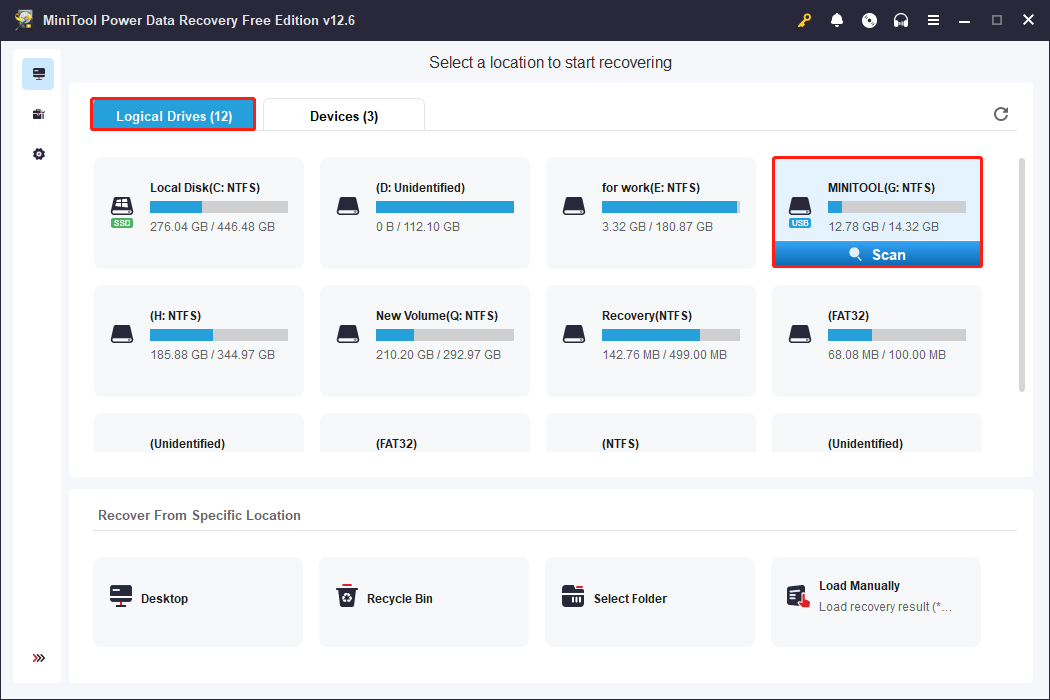
Step 2: Open the software and scan the target USB drive
Launch MiniTool Power Data Recovery. Under the Logical Drives tab, find the USB drive where your lost data was stored. Move your cursor to that drive, and the Scan icon will appear. Click it, and the scan will begin.
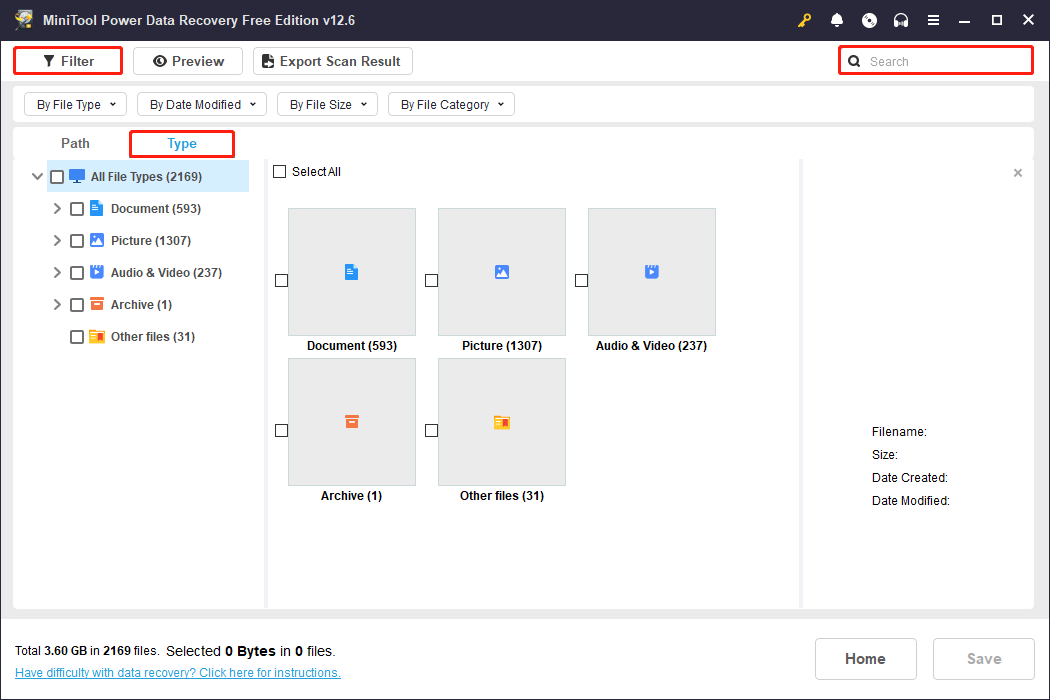
Step 3: Locate the required files with Type, Filter, and Search
Wait patiently for the scanning process to complete. Once it’s finished, the files will be listed under Path by default. You can locate files according to file structures under this tab.
Besides, to enhance your search experience, the software offers three useful features: Type, Filter, and Search. They can help you locate the target files faster and more accurately. Here’s a detailed description of each feature:
- The Type is a tool for classifying files according to file type, such as documents, pictures, videos, audio, etc.
- The Filter feature allows you to filter listed files based on four conditions: file type, modification date, file size, and file category.
- The Search feature is the most direct locating tool. It supports fuzzy search and partial matching. Enter the full or partial file name and press Enter, and MiniTool will search for matches.
Step 4: Preview the files before recovery
The Preview feature allows you to check the full file content. This helps avoid wasting the limited 1 GB free recovery quota on incorrect files.
Select the file you want to check and click Preview. The file contents will be displayed.

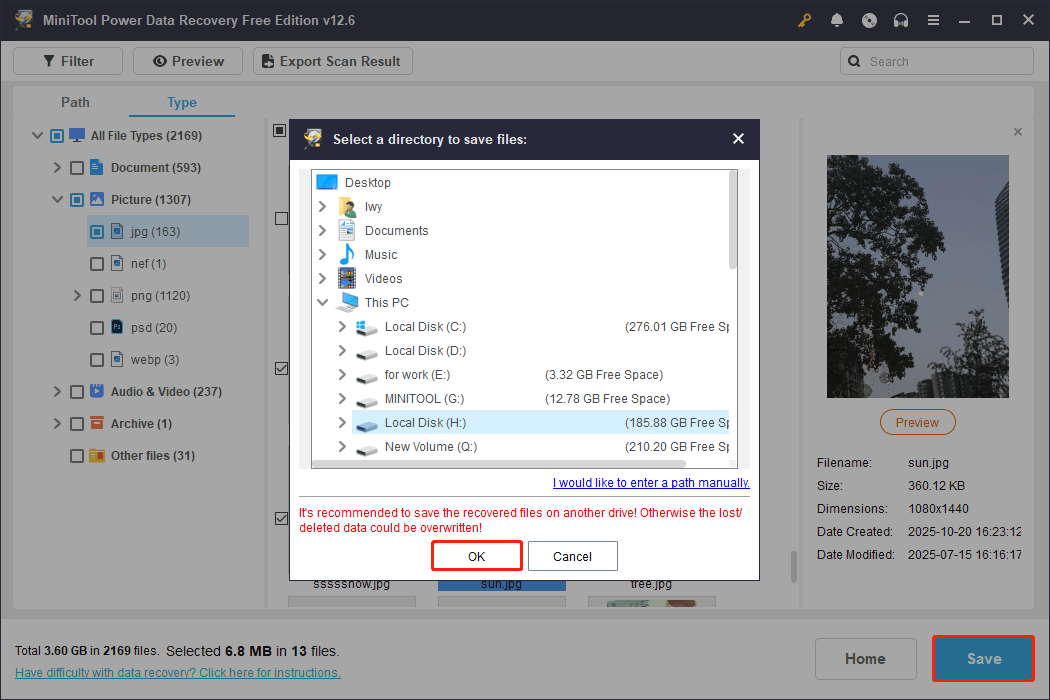
Step 5: Save the files to a new location
After checking the files, close the window. Select all the files you want and click Save. In the new pop-up window, choose a new and safe place for the recovered files. Finally, hit OK to start the USB drive data recovery.
When the files are recovered successfully, the Recovery Completed window will show.
Pros:
- The free edition supports recovering 1 GB of data, which may be sufficient for basic recovery needs.
- It supports previewing the entire file content.
- The interface is very simple and concise.
- It provides 24/7 technical support.
Cons:
- The free edition doesn’t support Windows 7.
2. Stellar Data Recovery for Mac
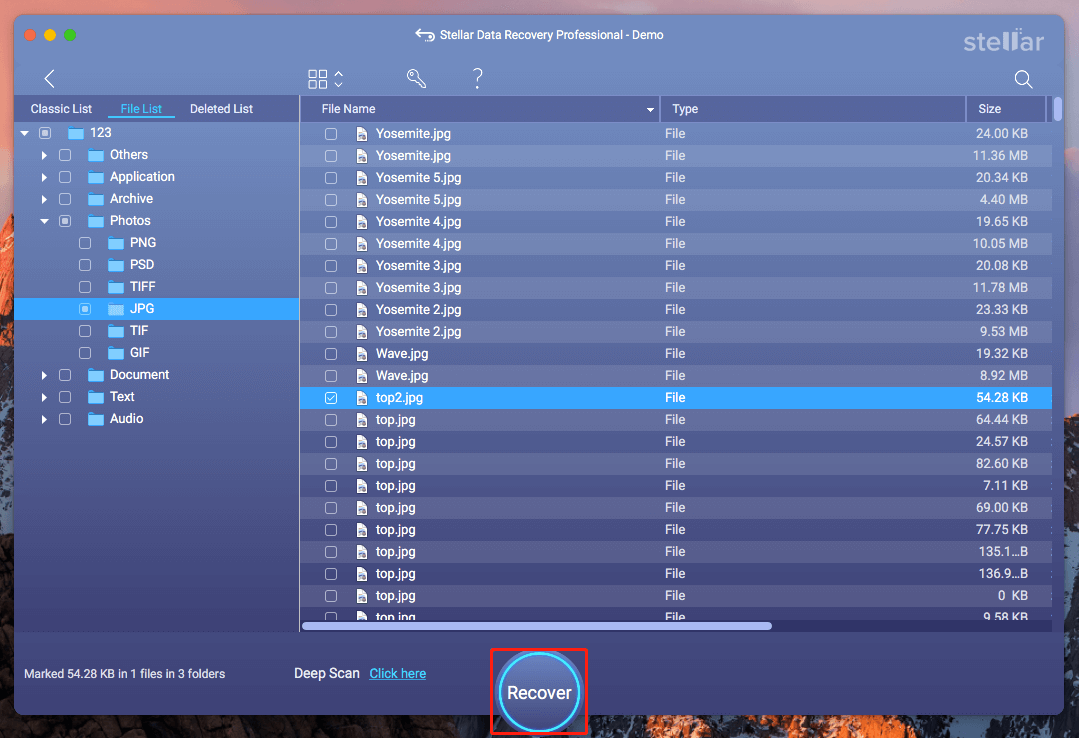
Stellar Data Recovery for Mac is data recovery software designed specifically for macOS users. This tool can recover data from Mac internal hard drives, external hard drives, solid-state drives (SSDs), USB flash drives, SD cards, and more.
Data Recovery for MacClick to Download100%Clean & Safe
It also supports over 300 file types, including documents, photos, videos, audio, emails, and more. It is fully compatible with OS X 10.11 El Capitan and later, including macOS 15 Sequoia and the latest M4-based Macs.
You can choose quick scan and deep scan options with it according to the different degrees of data loss. After scanning, it allows you to preview the recoverable files to ensure that they are correct.
Pros:
- It offers quick scan and deep scan options.
- You can preview files before recovery to ensure you’re getting the data you need.
Cons:
- The free edition does not support data recovery.
- It only supports the macOS system.
3. Disk Drill
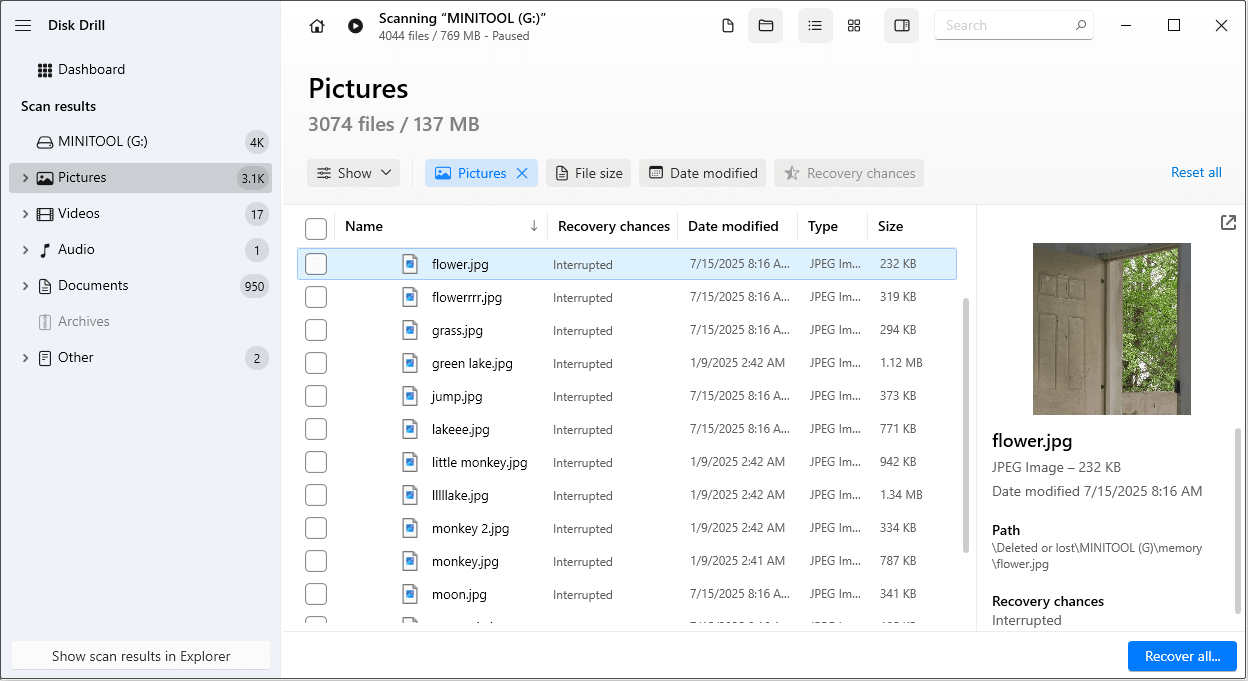
Disk Drill is professional data recovery software developed by CleverFiles. It is available for both Windows and macOS.
It can recover data from internal, external, and virtual hard drives, memory cards, and RAID arrays. What’s more, the Mac version supports data recovery from iPhones, iPads, Android devices.
This USB data recovery tool is capable of recovering over 400 file formats, such as documents, photos, videos, audio, compressed files, and more.
Pros:
- The scanning speed is fast.
- It is compatible with Windows and macOS.
Cons:
- The software setup progress is slow.
- The interface is lagging.
- It only allows you to recover 100 MB of files for free.
4. Recuva
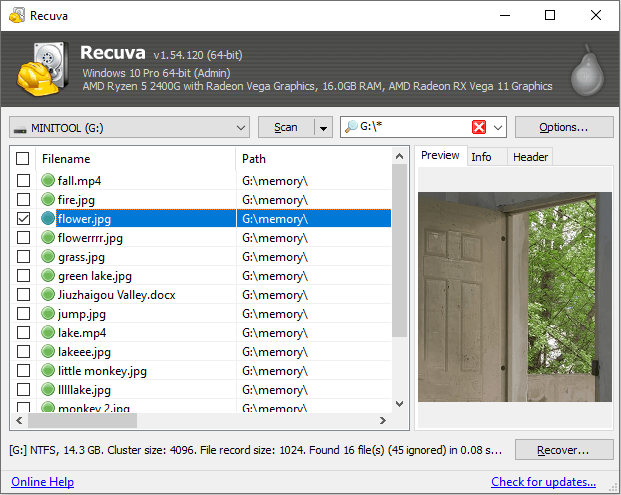
Recuva is lightweight data recovery software developed by Piriform, designed specifically for Windows users. It supports recovering accidentally deleted or lost files from hard drives, USB drives, SD cards, and other devices.
This tool offers Quick Scan and Deep Scan modes, recovers a variety of file types, and features file previews. And it displays the file status, marked as Excellent or Unrecoverable.
In addition to recovering lost files, Recuva offers a secure deletion feature to permanently erase sensitive data, making it versatile.
Pros:
- Recuva’s free edition has no recovery capacity limit.
- The software has a small installation size, taking up a small memory.
- It has a secure delete feature that can be used to destroy files.
Cons:
- It only supports the Windows operating system.
- The user interface lacks modern designs, which makes it outdated.
- It hasn’t been significantly updated since 2016, so features may not be up to date.
5. EaseUS Data Recovery Wizard
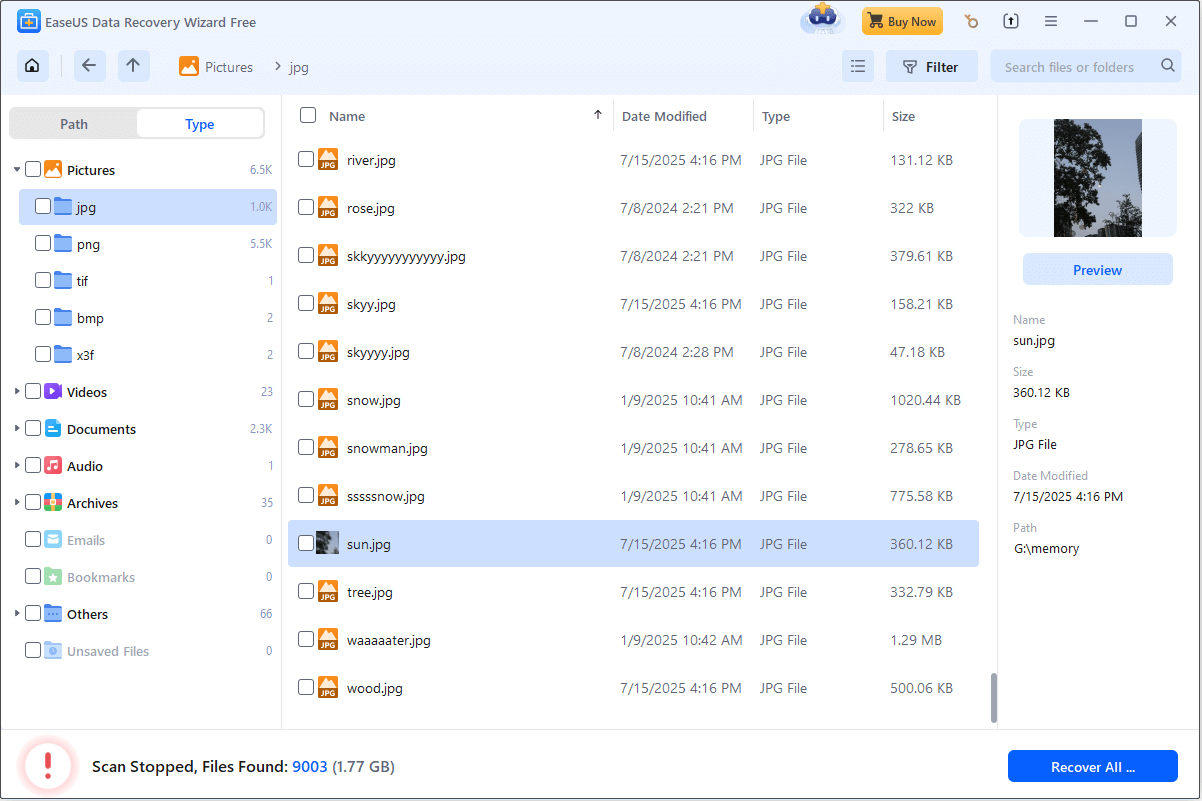
EaseUS Data Recovery Wizard is powerful data recovery software for Windows and macOS.
This tool can recover files lost from hard drives, USB drives, SD cards, digital cameras, and other devices. It can handle multiple data loss situations, such as accidental deletion, formatting, system crashes, virus attacks, and so on.
It supports recovery of over 1,000 file types, including documents, photos, videos, audio, and compressed files. Its simple, easy-to-use interface makes it suitable for beginners.
Pros:
- The free edition can recover up to 2 GB of data.
- The scanning speed is very fast.
- The interface is very modern.
Cons:
- Its free edition only supports previewing part of the content.
- Its paid editions are more expensive than other similar software.
6. Wondershare Recoverit
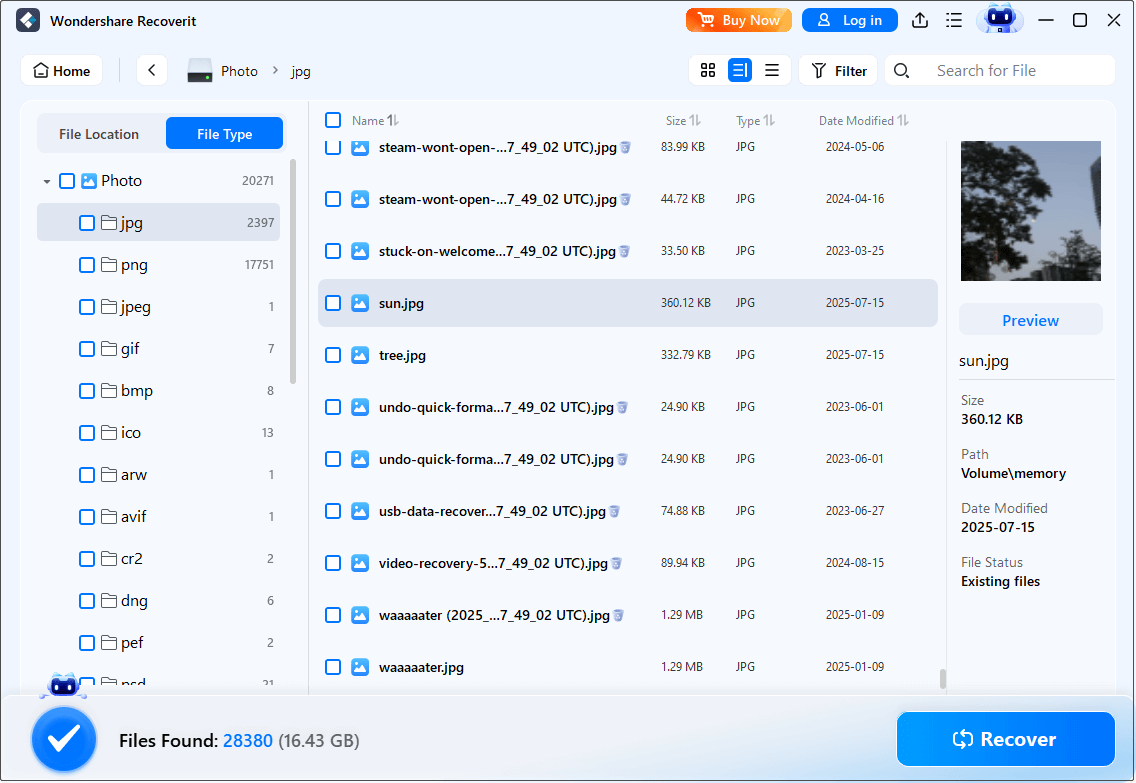
Wondershare Recoverit is a powerful data recovery tool. It widely supports recovering lost or accidentally deleted files from over 2000 storage devices.
Recoverit supports recovery of more than 1,000 file types and formats. In addition, it can cope with 500 real-life data loss scenarios, such as file deletion, device formatting, virus attacks, and system crashes.
Pros:
- It provides a repair function to repair damaged video files.
- It offers Windows and macOS versions to suit different user needs.
- It uses a guided workflow, significantly improving efficiency.
Cons:
- It gives you free recovery capacity for only 500 MB.
- It does not support previewing the full file.
These software are all very good USB data recovery tools. Choose the right one to perform the flash drive data recovery according to your needs.
How to Protect Your USB Data in the Future
After recovering USB data, let’s take a look at the possible causes of USB data loss and some protection measures.
Common Reasons for USB Data Loss
Here are some possible causes for USB data loss.
- Chip aging or long-term inactivity: Flash memory chips have a limited write lifespan. Prolonged use or power outages can affect read stability. And some low-quality USB flash drives may become empty after prolonged storage.
- Human error: The most common cause of data loss is human error, such as accidentally deleting files, mistakenly formatting a USB drive, or erasing important data without backing it up.
- File system errors: Forcefully removing a USB drive without properly ejecting it may corrupt the file system, rendering the original data unreadable.
- Virus or malware attacks: Some viruses can hide, encrypt, or delete files on a USB drive, or even corrupt the file system structure, causing the device to become RAW or display a “Format Required” message.
- Physical damage: As portable devices, USB drives are susceptible to external forces. Such physical damage can destroy the device and result in data loss.
Tips to Prevent Your USB Data from Being Lost
Having identified the reasons for USB file loss, we suggest the following protective actions:
- Choose a reliable USB drive. High-quality brands usually have better shock-resistant designs and data protection mechanisms, which can effectively reduce data damage and loss caused by falling or power outages.
- Back up the USB data. Before deleting data or formatting the USB drive, think twice about whether the file is no longer needed. If you are not sure, it is best to back up the data.
- Use “Safely Remove Hardware”. It is recommended to unplug the device properly through the “Safely Remove Hardware” function after each use. This avoids a sudden power outage or forced unplugging during data reading and writing.
- Scan the USB drive for viruses. Regularly scanning USB drives for viruses can help detect and remove potential threats promptly. It ensures the safety of your devices and data.
- Store your USB drive properly. The USB flash drive is small in size, so it needs to be properly stored. Do not rub it, do not place it in a humid place, and do not expose it to the sun.

To Summary
This post compared several data recovery tools and listed the advantages and disadvantages of each. When you need to recover data from a USB drive, download a USB data recovery tool based on your needs.
Don’t forget to check the reasons for USB data loss and take measures to protect your USB in your daily life and work.
For any MiniTool product-related inquiries, please reach out to us through [email protected].
About The Author

Position: Columnist
Chelsea graduated from university with a major in English. She has a strong interest in English writing. It is this passion for writing that led her to become an English editor. Her articles mainly foucus on data recovery and other computer industry news. As an energetic and outgoing girl, Chelsea enjoys listening to music, singing, riding bikes, and eating in her spare time.
User Comments :