

Are you a CD or DVD user? Have you ever encountered CD or DVD data loss and are looking for a way to recover CD/DVD disk? If so, you can try MiniTool Power Data Recovery, the best data recovery software.
It seems that compact disk-like CDs/DVDs are exiting the stage of history step by step mainly because laundry lists of more convenient and safer storage devices shoot up. USB flash drive, SD card, and memory stick are included. Besides, an increasing number of device manufacturers have given up on CD/DVD; they choose not to include a snap-in CD/DVD drive in their new products. After all, the compact disk is used less and less. Its previous characteristics – large capacity, low cost, good stability, long service life, and great carry convenience – are no longer advantages for now. In this way, they are capable of greatly reducing the equipment size as well as improving the overall performance of equipment.
Yet, this doesn’t mean CD or DVD is totally out of date. On the contrary, many users still prefer to use CD/DVD for data storage, such as collecting favorite music tracks. In addition, to meet users’ demands for using CD/DVD to read and save data, manufacturers have released movable optical disk drives. Thus, users can connect the movable drive to a computer (desktop or laptop) and then insert a CD/DVD into it for data access and management.
Well, just like any other storage device, a CD/DVD is also not a safe place for data saving. Even worse, we have to admit that CD/DVD are relatively more vulnerable than other devices. However, there’s also good news – it’s possible and not difficult for even inexperienced people to recover CD/DVD disk after they find the the CD/DVD was damaged and important data were lost.

Data Loss Cases on CD/DVD
Have you found yourself stuck in any of those situations? Of course, we hope you will never come across any of them.
- You concentrated on burning a CD or DVD, but only to find some of the files here appear to be inaccessible or lost when you finally finish this process.
- When you plan to make some changes to (manage or update) data saved on a CD/DVD, you cause vital file loss because of improper operations like pressing the wrong button. Of course, this will not happen if the disk you’re running is a CD-R or DVD-R.
- While you’re in the middle of something, such as modifying file content and location, you’ll fall into big trouble if power goes out suddenly without giving a sign.
- After adding new data to your CD or DVD, you disappointedly discover that some old files saved there before are now missing.
- If a virus is hidden in the files you prepare to transfer to CD/DVD, both the old files and newly added files are in danger of being deleted/damaged.
- Even if you have done nothing wrong to the CD/DVD disk, data could be lost there. This often appears due to the not uncommon reason – physical damage, such as scratch, stain, a short circuit, and component deformation.
When those situations take place, we know, that all of you would try your best to retrieve the lost files as long as they are not useless. But no matter whether you need to recover files from CD or DVD, what you should remember is not to perform any operations again to the target disk, to avoid data overwriting and permanent data loss.
Basic Knowledge of Compact Disk
Before telling users how to recover files from CD or how to recover DVD files for free, we feel it’s essential to first focus on the compact disk itself. Then, we’ll naturally change our topic to CD data recovery and DVD data recovery to make a simple analysis of them.
A compact disk, also known as an optical disk, is a disk that uses optical information as the storage carrier to save data for us. It is roughly divided into two categories according to the data writing mode: rewritable disk and non-rewritable disk. A compact disk can be used to read and write data thanks to the laser principle.
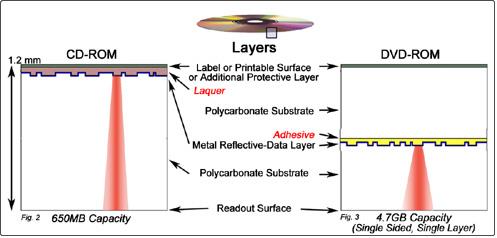
According to the structure, the compact disk is generally divided into several types, such as CD, DVD, and blue-ray disc. Though these kinds of disks are different in structure, they share the same main structural principle. Well, there is no difference in the structure between rewritable CDs and non-rewritable CDs; they mainly differ in some manufacturing processes and the application of materials. As for DVDs, the situation is almost the same.
Since compact disks like CDs and DVDs are more fragile when compared to other storage devices, such as USB flash drives and mobile hard disks, we strongly recommend all users be careful enough when using a CD/DVD, especially when moving them (inserting them into CD driver or taking it out from a box). Besides, users have to put CD/DVD in an appropriate environment when it is not in use: water-proof, dust-proof, proper humidity, applicable temperature range, and so on.
Keep this in mind: even a slight scratch or a tiny oil stain on a compact disk surface is likely to cause data loss problems. In such cases, users have no choice but to recover CD/DVD disk on their own or by hiring professionals.
Reading Technology of Compact Disk
There are 3 kinds of reading technologies adopted by compact disks to read data. Now, we’re going to guide all of you through them.
CLV (Constant Linear Velocity) technology: to maintain a constant data transmission rate, it will change the rotational speed of the disk at any time. As a result, the rotational speed of the disk while reading the data near the center is much faster than that of the disk while reading data written on the edge.
CAV (Constant Angular Velocity) technology: it uses the same speed to read data on the entire disk. On the same compact disk, the transmission speed of inner data is lower than that of outer data. Thus, while outer data are read, optical disk transmission speed can be well reflected.
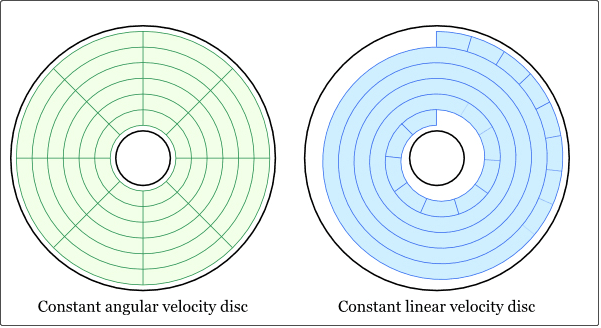
PCAV (Partial Constant Angular Velocity) technology: this is a new technology that integrates CLV and CAV. When reading data saved away from the disk center, it uses CLV technology; while reading data saved near the disk center, it uses CAV technology instead. In this way, the overall data transmission speed is improved.
Classification & Characteristics of CD/DVD
As we said, compact disks can be roughly divided into several categories, including CDs and DVDs. CD/DVD can be further divided into more types.
Common types of CD:
- CD-ROM (Compact Disc Read Only Memory): in 1988, the Yellow Book Standard was released to define archive file format; it also defines MODE1 – used for computer data storage, and MODE2 – used for storing compressed videos and images. This makes CD become a universal storage medium. In addition, error detection codes and correction codes are added to ensure the correct and complete read of computer data.
- CD-R (Compact Disc Recordable): it is a standard that can be written once, but read permanently. Once data are written to the CD-R, it can never be rewritten. The CD-R that has already been written can be read on a CD-DA or CD-ROM drive. By the way, the working principle of CD-R is the same as that of CD-ROM.
- CD-RW (Compact Disc ReWritable): since it adopts phase-changed technology, CD-RW’s laser reflectivity is much lower than that of many other CDs. At the beginning of 1996, Ricoh, Philips, SONY, Yamaha, Hewlett-Packard (HP), and Mitsubishi Chemical Corporation established an industrial forum and released the CD-RW format standard. Undeniably, CD-RW and CD-R share the same burning method, and the biggest difference is whether the disc is a rewritable one or not.
- Photo-CD (Photo Compact Disc): in 1989, KODAK Company launched the Orange Book Standard for photo discs, which can store 100 high-resolution photos in five different formats.
Common types of DVDs:
- DVD-RAM (Digital Versatile Disc Random Access Memory): it is made based on Phase-changed Dual and partial MO technology. The capacity ranges from 2.58GB to 4.7GB. The first generation of DVD-RAM appeared in June 1998, and one year later, version 2.0 was launched. In 1999, Panasonic and Hitachi launched DVD-ROM to support DVD-RAM.
- DVD-R (Digital Versatile Disc Recordable): this is just like CD-R, which can only be burned once. A laundry list of DVD readers and players all give support for DVD-R. Its capacity is extended to 4.7GB from 3.95GB. The early DVD-R includes 2 types, which are respectively DVD-R(G) and DVD-R(A), while the latter is designed for the professional market.
- DVD-RW (Digital Versatile Disc ReWritable): in December 1999, the DVD-RW home video recorder was launched by Pioneer in Japan. Just like CD-RW, it can be rewritten over 1,000 times. DVD-RW adopts Track Pitch, Mark Length, and Rotation Control, which is similar to DVD-R. With good compatibility, DVD-RW can be read by all DVDs of Pioneer, Sharp, and Zenith. The formatting process of DVD-RW will take a little bit of time.
- DVD-Video (Digital Versatile Disc Video): it is a DVD specification that has been mainly applied to the consumer electronics field to read digital audio and video data.
- DVD-Audio (Digital Versatile Disc Audio): it is the DVD specification used to read digital music data; it is also mainly applied to the consumer electronics field, focusing on ultra-high-quality performance.
How to Recover CD/DVD Disk With Data Recovery Software
In general, CDs and DVDs are used to store personal/business data just like other devices. However, the biggest difference lies in that data on both CD and DVD can’t be deleted or formatted casually unless it is a CD-RW or DVD-RW.
If users are using a CD-ROM, they cannot add new data or perform any other operations to the disk, on which some data are burned by default. However, if users are running a CD-R, they can burn their music tracks, photos, or other things on the disk once, and then use it whenever they want afterward. In addition, they need to be aware of one thing: files saved on the CD-R couldn’t be modified. CD-R is a kind of write-once disk, so it is also not able to be formatted if users intend to clear all data saved there.
Nevertheless, if a CD-RW/DVD-RW is used, users can modify files and add new data to the disk according to their needs. In addition, if the CD-RW or DVD-RW with important files & folders is formatted or removed by mistake, CD recovery/DVD recovery should be performed as soon as possible. That is because lost data could be gone for good once they are overwritten.
Considering that we found many users are seeking ways to recover deleted files from CD for free, we decided to introduce a piece of professional CD recovery software – MiniTool Power Data Recovery Free to help them with that. If you are one of them, you can follow the guide below to recover CD/DVD disk.
Firstly, download and install MiniTool Power Data Recovery Free to your computer’s hard disk. The free edition supports recovering up to 1 GB of data at no cost.
MiniTool Power Data Recovery FreeClick to Download100%Clean & Safe
Secondly, launch this file recovery tool to get its main interface. Here, go to the Devices tab where all disks connected to your computer are displayed. Then select the CD/DVD that includes data waiting to be restored and click Scan to detect deleted or lost files.
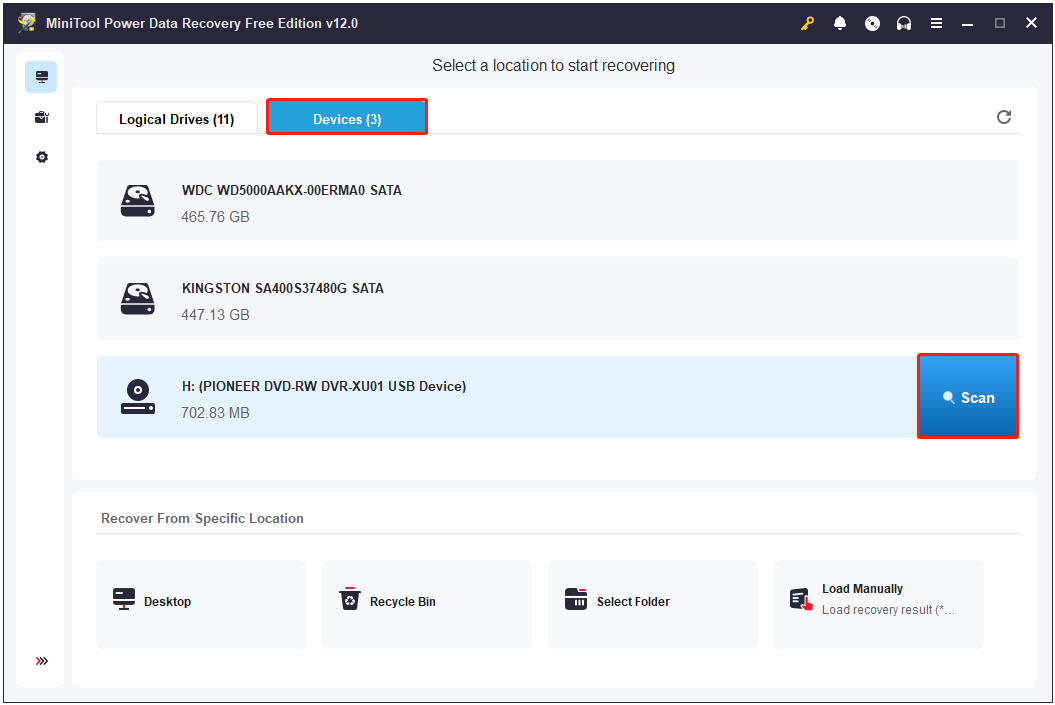
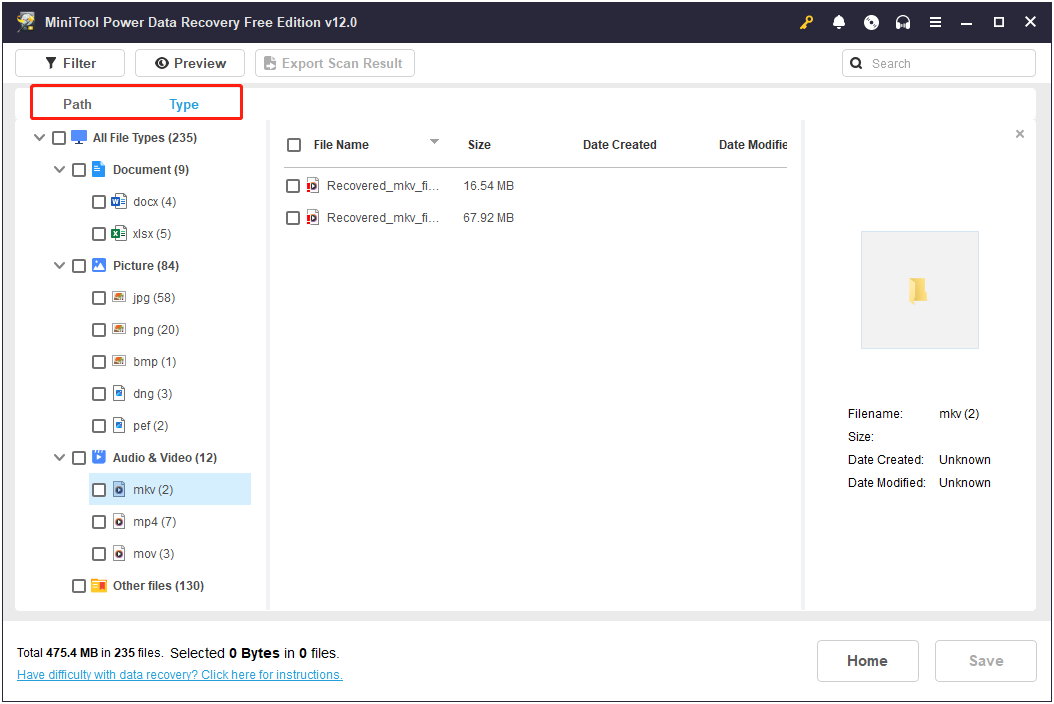
When the full scan is finished, you can start looking for the files you need to recover. You can directly expand each folder under Path to locate the desired files since all the found items are listed by file path by default. Alternatively, you can move on to the Type category to view files under different file types.
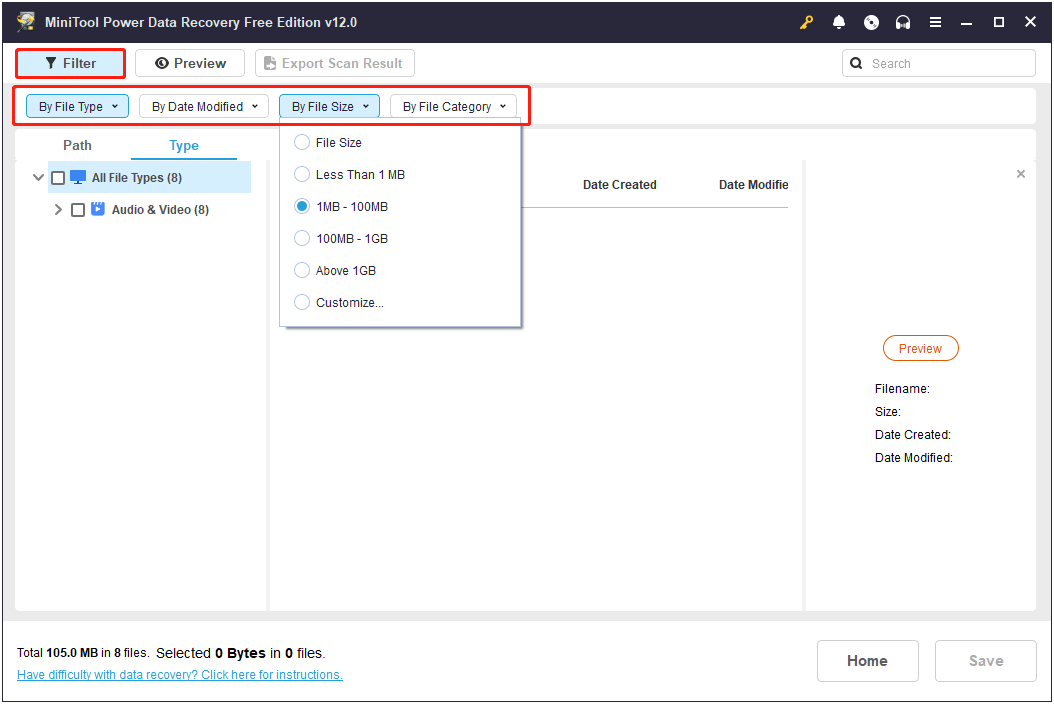
Furthermore, this file recovery software is equipped with another powerful feature – Filter. It enables you to filter out unwanted files by specifying multiple filtering criteria, including file type, file modification date, file size, and file category.
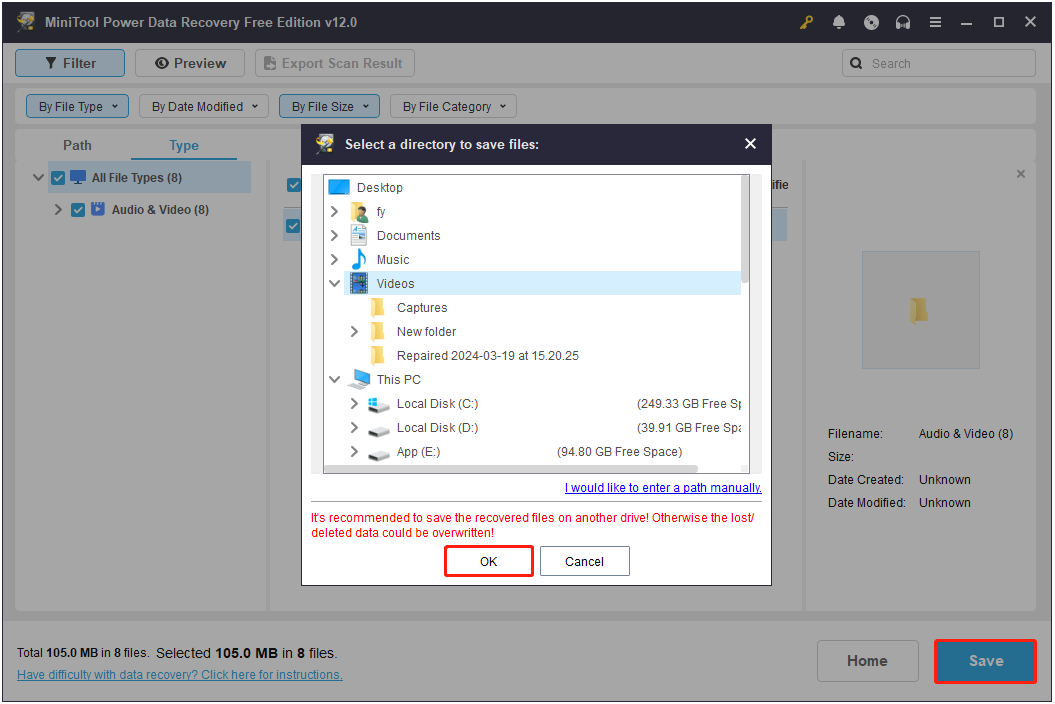
Once you find the needed files, tick the checkboxes next to them, and then click Save. When a small window prompts, select a safe directory on your computer or external disk to store the recovered files and then click OK.
That’s it for all the steps to recover CD/DVD disk.
More Information About MiniTool Power Data Recovery
In addition to CD/DVD data recovery, MiniTool Power Data Recovery also works great on SSD data recovery, USB drive recovery, SD card data recovery, memory card recovery, and more.
Moreover, this robust recovery software excels at recovering files under a diversity of data loss situations, such as accidental disk formatting, automatic file deletion by viruses, disk file system corruption, and so on.
More exciting still, the advanced editions of MiniTool Power Data Recovery support recovering files when your computer system crashes. See How to Recover Data When PC Won’t Boot.
Conclusion
This article mainly introduces the types and features of CDs and DVDs and how to recover CD/DVD disk files with the help of MiniTool Power Data Recovery. If you encounter any issues or have any problems with this MiniTool software, please reach out to the support team at [email protected].
About The Author

Position: Columnist
Shirley holds a bachelor’s degree in English and has been an editor at the MiniTool Team for many years. She specializes in IT-related content, with a focus on data recovery, file backup, disk management, and other technical topics. She is committed to delivering clear, accurate, and practical solutions to help users resolve common computer issues.
User Comments :