

Despite the rapid development of digital storage technology, CDs and DVDs are still used for data archiving, media distribution, and long-term preservation.
This guide introduces the main CD/DVD types and analyzes their typical lifespan and key influencing factors.
CD/DVD Basics and Types
CDs and DVDs are optical storage media that differ from hard drives in both structure and usage. Due to their great portability and broad compatibility, they are still used in data distribution and file archival.
For disc manufacturing, CDs and DVDs typically consist of a polycarbonate substrate, a dye-based or reflective metal layer, and a protective lacquer coating.
CDs are generally classified into three main types:
- CD-ROM (Compact Disc Read-Only Memory): Pre-recorded and not writable.
- CD-R (Compact Disc Recordable): Allows one-time recording, and files in it cannot be modified.
- CD-RW (Compact Disc Rewritable): Supports multiple erases and rewrites.
DVDs are classified into these types:
- DVD-ROM (Digital Versatile Disc Read-Only Memory): Read-only.
- DVD-R/DVD+R: One-time burning.
- DVD-RW/DVD+RW: Multiple recording cycles.
Next, this guide explores two questions: whether CDs wear out from use, and how long they typically last.

How Long Do CDs and DVDs Last
According to a study by the Library of Congress, certain optical discs may have a lifespan of up to 500 years or more. However, such cases are exceptional.
In most situations, CDs and DVDs do not last that long. Their estimated lifespans are outlined below.
How Long Do CDs Last
The lifespan of CDs ranges from 10 to 100 years, depending on the disc type and storage conditions.
- CD-ROM: They can last 50 to 100 years or more under proper storage conditions.
- CD-R: Their lifespan is 10 to 100 years, depending on the dye and metal layer used.
- CD-RW: They are less durable, with an expected lifespan of 20 to 50 years.
How Long Do DVDs Last
Based on various practical studies and observations, the estimated lifespans of different types of DVDs are as follows:
- DVD-ROM: Typically, they last between 20 and 100 years.
- DVD-R/DVD+R: They generally have a lifespan of 30 to 200 years, depending on manufacturing quality and storage conditions.
- DVD-RW/DVD+RW: These rewritable discs tend to have shorter lifespans, typically around 25 years, with some lasting longer.
After having a basic understanding of the CD and DVD lifespan, the next step is to learn the factors that influence their longevity. This can help you select and manage discs for long-term data storage.
What Factors Affect CD/DVD Lifespan
Typically, the lifespan of CDs and DVDs is influenced by three main factors: environmental conditions, handling methods, and manufacturing quality.
Environmental Factors
Temperature:
High temperatures accelerate the aging, deformation, and cracking of disc materials, which can lead to physical damage and data loss.
Humidity:
Excessive humidity allows moisture to seep into the disc, causing oxidation of the reflective aluminum layer and reducing its reflectivity. This can lead to read errors or data loss.
A Library of Congress study found that storing discs at 10°C and 35% relative humidity can extend their lifespan up to 11 times compared to 25°C and 50% RH.
Illumination:
Prolonged exposure to light, especially ultraviolet radiation, can degrade the organic dyes in the data layer, potentially leading to data loss or disc failure.
Disc Handling
Scratches and fingerprints:
Surface scratches and fingerprints can interfere with the laser’s ability to read data, resulting in playback errors or unreadable discs.
Frequent writing and erasing:
Rewritable discs such as CD-RWs and DVD-RWs have a limited number of rewrite cycles. Repeated writing and erasing can degrade the data layer over time.
Improper storage:
Stacking, bending, or storing discs in high-temperature or high-vibration environments can cause physical damage to the discs.
Manufacturing Quality
Materials used:
The type and quality of materials, such as the polycarbonate substrate and the reflective layer, can affect disc longevity.
Reflective layers made of gold or silver are generally more resistant to corrosion and offer better durability than those made of aluminum.
Manufacturing process:
The manufacturing process impacts the quality of the adhesive layers and the stability of the protective coating. Poor manufacturing can lead to early degradation.
Brand and batch variability:
Production standards can vary between manufacturers, factories, and even batches. Therefore, optical discs from different brands or production batches may have significant differences in lifespan.
How to Extend CD/DVD Lifespan
After understanding what influences CD and DVD lifespan, take steps to extend their longevity during disc selection and use.
Here are some useful tips:
- Reduce exposure to high temperatures, humidity, or ultraviolet radiation.
- Store discs individually and upright in CD cases instead of stacking them.
- Minimize the number of rewrites.
- When handling a disc, hold it by the center hole and outer edge instead of touching the disc surface directly.
- If you need to label a disc, use a non-solvent-based marker and write only on the clear inner hub instead of the reflective area.
- When cleaning a disc, wipe radially outwards from the center, not in a circular motion.
- Choose discs from high-quality brands, which typically have superior craftsmanship and more durable materials.
How to Recover Data From a Slightly Corrupted CD/DVD
If your CD or DVD experiences data loss or minor corruption, there is still a chance to recover your files.
MiniTool Power Data Recovery, a professional and reliable file recovery tool, is recommended.
It can recover data from CDs, DVDs, and various other storage devices on Windows 11/10/8/8.1. It supports recovering a wide range of file types, including documents, music, videos, photos, and more.
The software is available in multiple editions, and the free edition allows up to 1 GB of data recovery at no cost. Download and install the free data recovery software to start recovering your files.
MiniTool Power Data Recovery FreeClick to Download100%Clean & Safe
Step 1. Select the CD/DVD to Scan
On the main interface of this file restore tool, go to the Devices tab, where all physical disks and discs are displayed. Next, select the target CD/DVD and click Scan to start scanning for files.
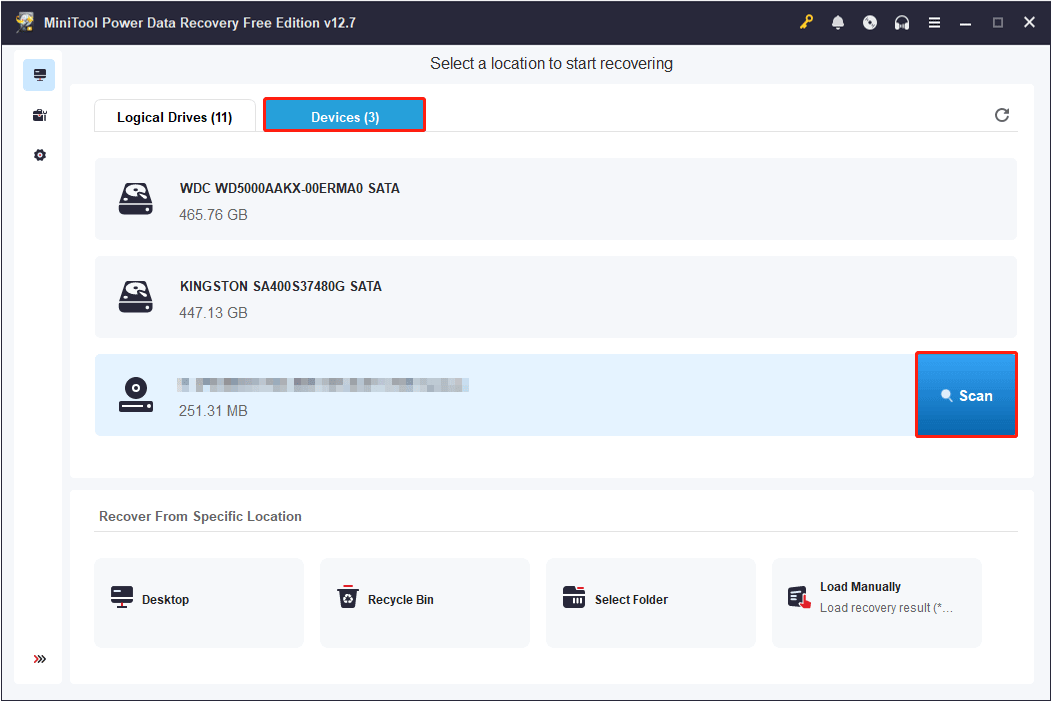
For the best scanning results, it is recommended to wait for the scan process to complete automatically.
Step 2. Locate and Preview Wanted Files
After scanning, start browsing the found files and check the ones you want to recover. All recovered files are organized in two views:
- Path: Displays files according to their original folder structure.
- Type: Groups files by file type and format.
To help you find the target files more efficiently, this recovery tool provides the Filter and Search features:
- Use Filter to filter files by file type, modification date, file size, and file category.
- Use Search to locate a specific file using a partial or complete file name.
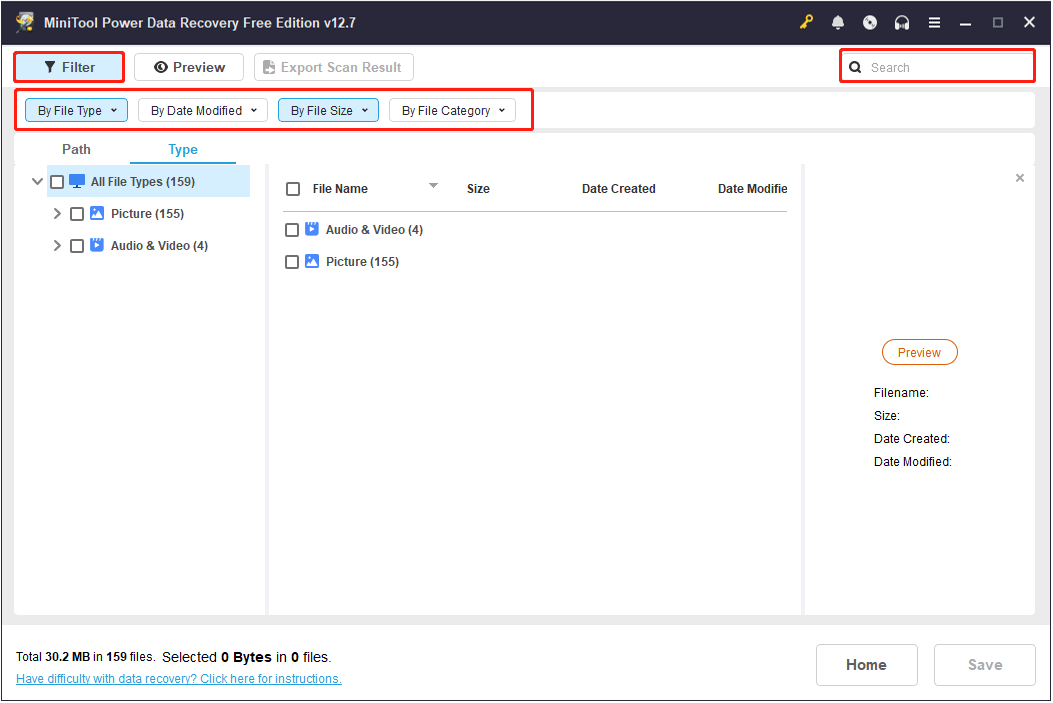
Additionally, you can double-click each file to preview its content before recovery. Since the software only allows 1 GB of free recovery, it is necessary to preview files.
Supported file types to preview include documents, videos, images, audio, and more.
Step 3. Save Desired Files
After checking all desired files, click Save. When the new dialog window pops up, select a drive or directory and click OK to store the recovered files.
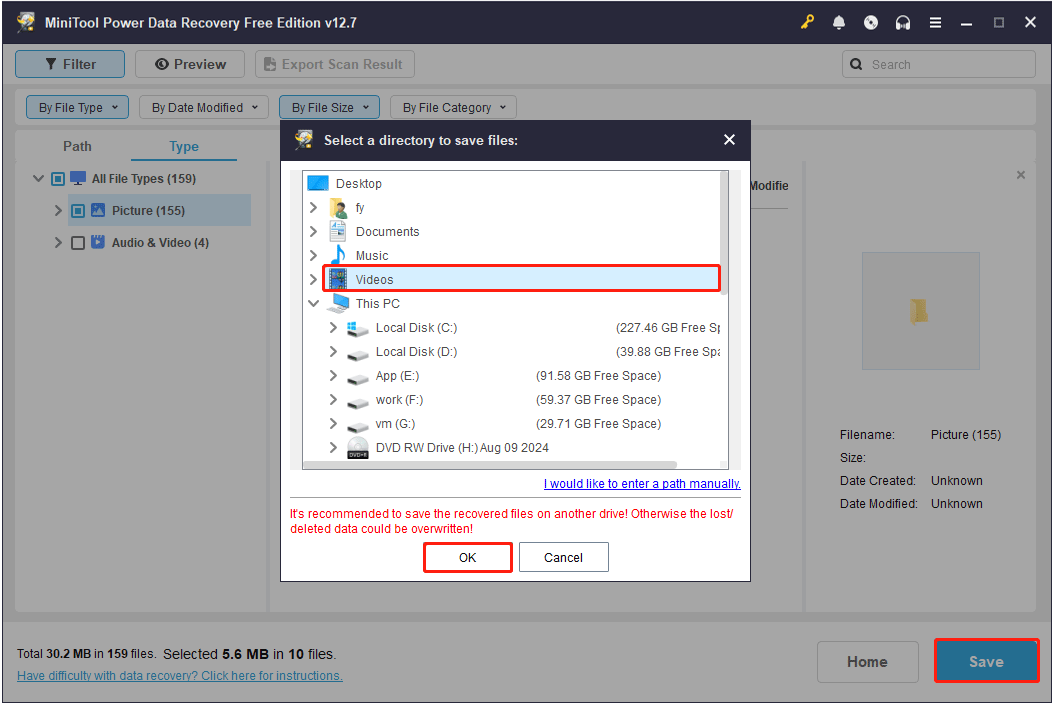
After the recovery process is completed, open File Explorer and access the specified location to view the recovered items.
Bottom Line
In conclusion, the lifespan of CDs and DVDs depends on various factors, including environmental conditions, how the disc is handled, and the quality of its manufacturing.
If stored properly and used carefully, CDs can typically last for decades or longer.
This article also introduced MiniTool Power Data Recovery for retrieving files from slightly damaged CDs or DVDs. If you need to recover data, it is a reliable option worth trying.
For any issues regarding MiniTool software, please contact the support team at [email protected].
How Long Do CDs Last FAQ
If a disc has important data, you can keep it. But it is recommended to make a backup, because discs can go bad over time.
If the disc is badly damaged, like cracked or detached, it is hard to recover the data. In this case, keeping the disc may not be useful.
About The Author

Position: Columnist
Shirley holds a bachelor’s degree in English and has been an editor at the MiniTool Team for many years. She specializes in IT-related content, with a focus on data recovery, file backup, disk management, and other technical topics. She is committed to delivering clear, accurate, and practical solutions to help users resolve common computer issues.
User Comments :