

Quick Answer:
A quick-formatted DVD-RW disc may still be recoverable if no new data has overwritten the lost files. You can use data recovery software such as MiniTool Power Data Recovery to scan the disc for lost files.
In contrast, a fully formatted DVD-RW has a much lower chance of recovery because the files may have been completely erased during the formatting process.
__________________________________________________________________________________
Many users accidentally format rewritable DVDs without backup and later wonder whether they can recover data from formatted DVD-RW. Here is an example:
“My fiancée received a new video camera for her birthday and recorded some videos that day on an 8 cm DVD-RW. Unfortunately, she formatted the disc again and erased all the data. Is there any solution I should try to recover data from a formatted DVD?”reddit.com
Formatting a DVD-RW does not always mean that all data is permanently erased. In this guide, we will explain how DVD-RW formatting affects stored data and what methods you can try to recover lost files.
Can You Recover Data from a Formatted DVD-RW
Whether the data can be recovered after formatting a DVD-RW depends on how the disc was formatted and whether new data has been written to it.
Quick Format vs Full Format: Which One Allows Recovery
A quick format removes the file system information and marks the disc as available for new data, but the actual data remains on the disc until it is overwritten. Data recovery tools can scan the disc and find recoverable files.
However, a full format performs additional operations to prepare the disc for reuse. This process overwrites or erases existing data areas, making recovery difficult or even impossible.
Next, we will guide you through the detailed methods to recover files from a formatted DVD disc.
How to Recover Data from Formatted DVD-RW
Method 1. Recover Data Using Data Recovery Software
Using DVD recovery software is the first method to recover a formatted DVD because it is faster and less expensive than professional recovery services.
However, not every recovery program supports optical media. You need a tool that can detect and scan DVDs, such as MiniTool Power Data Recovery.
This tool can help recover videos, photos, documents, and other types of data from DVDs, CDs, and other storage media.
The software is fully compatible with Windows 11/10/8.1/8. You can use the free edition to scan the DVD-RW disc and recover up to 1 GB of data for free.
MiniTool Power Data Recovery FreeClick to Download100%Clean & Safe
Step 1. Connect and scan the DVD-RW disc.
Insert the formatted DVD-RW into your computer’s DVD drive and make sure it can be detected by Windows.
Launch MiniTool Power Data Recovery to enter its main interface. Go to the Devices tab and select the formatted DVD disc to scan for recoverable files.
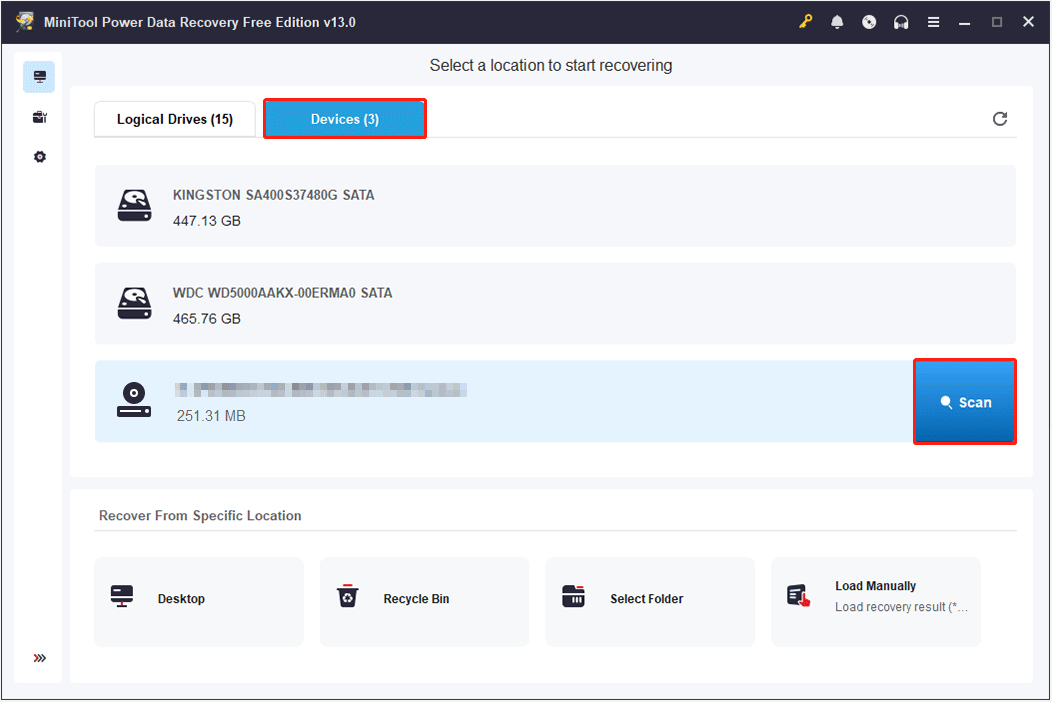
The scanning duration mainly depends on the disc size, the amount of data stored, and the condition of the disc. A larger disc, more data, or a corrupted DVD-RW may require a longer scanning time.
Step 2. Find and preview recoverable files.
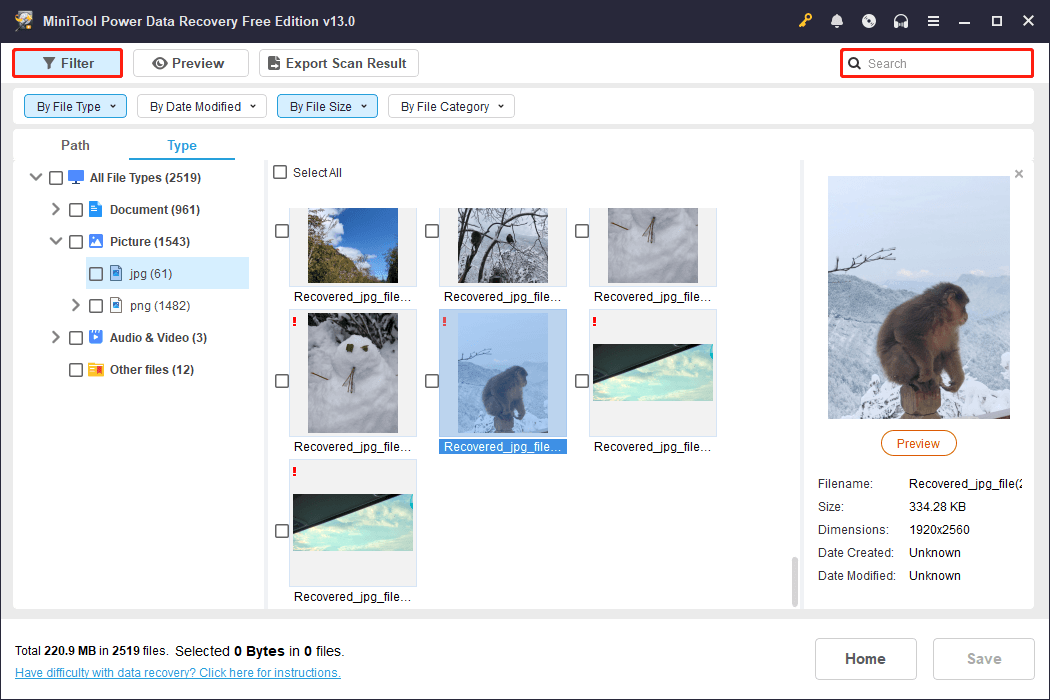
After scanning, browse the found files by file path or type. You can use the Filter feature to filter listed files by file type, modification date, size, and category, or use the Search feature to search for a specific file by using its file name.
Double-click the target files to check whether their contents are intact.
Step 3. Save the required files.
Finally, select the files you want to recover, click Save, and store them to your computer. Do not save recovered files back to the same DVD-RW, as this may overwrite other recoverable data.
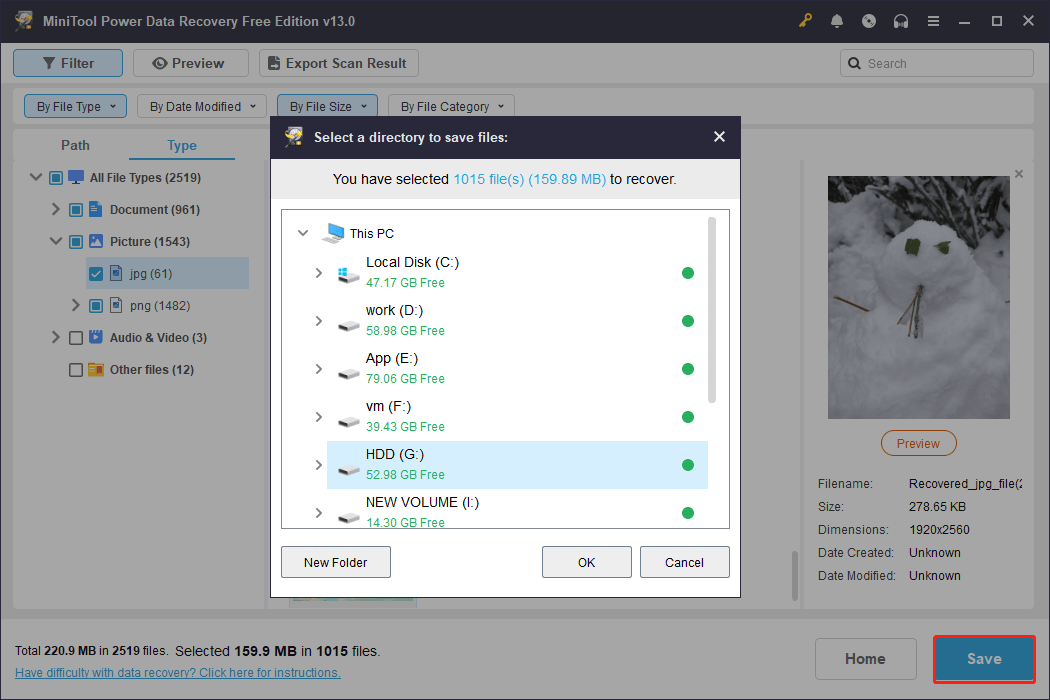
With the free edition of MiniTool Power Data Recovery, you can recover up to 1 GB of data. If the recoverable data exceeds 1 GB, upgrading to the Personal edition is required to save the remaining files.
Method 2. Seek Help from DVD Recovery Services
If the recovery software cannot find your lost files, professional DVD recovery services may be another option.
This method is more suitable when your drive is in the following situations:
- The computer or recovery software cannot recognize the disc
- The DVD-RW disc is physically damaged
- The disc has severe scratches or cracks
Professional recovery specialists may use specialized optical disc readers and recovery techniques to extract data from your formatted DVD-RW.
Formatted DVD-RW Recovery: Software vs Professional Services
The following table compares DVD recovery software and professional recovery services to help you understand their differences in cost, difficulty, and recovery capabilities.
| Data Recovery Software | Professional Recovery Services | |
| Best for | Accidentally formatted DVD-RW, deleted files, logical data loss | Physically damaged discs or severe data loss situations |
| Cost | Usually free to low-cost | Usually more expensive |
| Recovery process | Scan the disc and recover found files by yourself | Specialists use professional equipment and techniques |
| Required skills | Easy for most users | No technical knowledge required |
| Success chance | Higher when data has not been overwritten | Better for unreadable discs |
Useful Tips to Prevent DVD-RW Data Loss
Formatting is one of the most common causes of DVD-RW data loss, but it is not the only one. Files stored on rewritable discs can also become inaccessible due to accidental deletion, physical damage, or improper handling.
Following these tips can help reduce the risk of losing important data.
1. Keep Copies of Important Files
Since rewritable discs can be affected by scratches, aging, and writing errors, important files should always have another copy stored on a different storage device.
Follow the 3-2-1 backup rule: keep at least 3 copies of your data, store them on 2 different types of media, and keep 1 copy in another location.
2. Avoid Reformatting Discs Without Checking Data
Although DVD data recovery may still be possible after a quick format, continued use of the disc can overwrite recoverable data and reduce the recovery success rate.
Therefore, if you prepare to format a DVD-RW, make sure there is no important data stored on it.
3. Use Reliable Burning Software and Avoid Interruptions
Errors or sudden interruptions during the writing process can make a DVD-RW disc unreadable or cause data corruption.
Therefore, use reliable disc-burning software to write data, and avoid shutting down the computer or ejecting the disc while writing is in progress.
4. Avoid Using DVD-RW for Long-Term Storage
DVD-RW discs are designed for repeated writing and rewriting, but they are not ideal for storing important files for many years. Over time, the recording layer may degrade, causing files to become unreadable.
It is recommended to use DVD-RW mainly for temporary storage, file transfer, or short-term backups.

5. Store Optical Discs Properly
Physical damage, such as scratches, dust, and heat, is a common reason why DVD-RW discs become unreadable. To prevent this, store DVD-RW discs in protective cases and keep them away from high temperatures and humid environments.
When inserting or removing a disc from a computer, always hold it by the edges or the center hole to prevent fingerprints and smudges on the data surface.
Conclusion
To sum up, recovering data from a formatted DVD-RW is possible when the disc has only been quickly formatted, and no new data has overwritten the original files.
To recover files after formatting a DVD-RW disc, stop using the disc immediately and then try free data recovery software first. If the software recovery fails, consider professional DVD recovery services.
Although DVD-RW discs are convenient for recording and rewriting data, they should not be the only storage location for important files. Keeping regular backups is necessary to prevent permanent data loss.
If you have any questions when using MiniTool Power Data Recovery, contact the support team at [email protected].
Frequently Asked Questions About Formatted DVD Recovery
However, if the disc has been fully formatted or overwritten with new data, the chances of recovery may become impossible.
A typical scan may take several minutes to an hour, while severely damaged discs or professional recovery services may require much longer.
About The Author

Position: Columnist
Shirley holds a bachelor’s degree in English and has been an editor at the MiniTool Team for many years. She specializes in IT-related content, with a focus on data recovery, file backup, disk management, and other technical topics. She is committed to delivering clear, accurate, and practical solutions to help users resolve common computer issues.
User Comments :